
Flowbird Parking
FlowbirdAuto & Vehicles
3.81.25K Reviews
- Version
- 3.17.4
- Installs
- 1.00M
- Age Rating
- Everyone
Screenshots
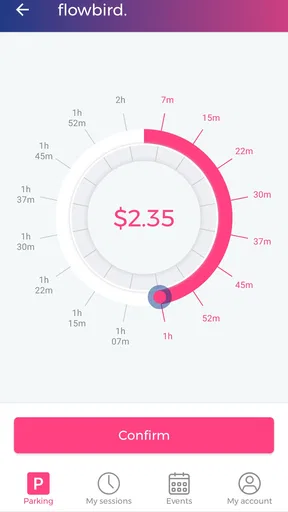
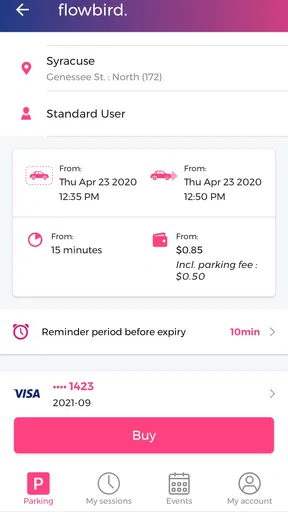
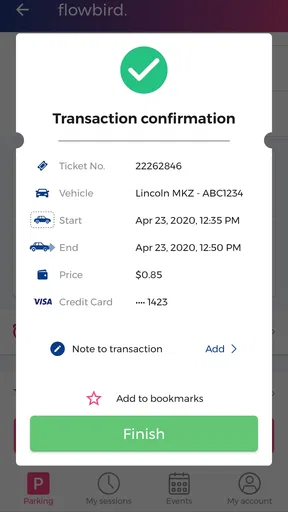
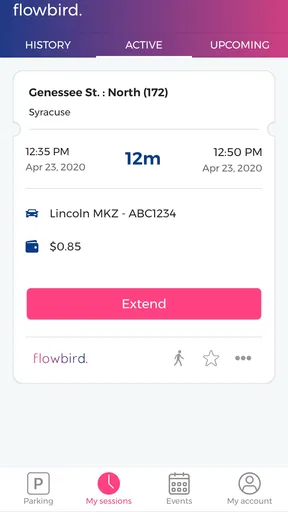
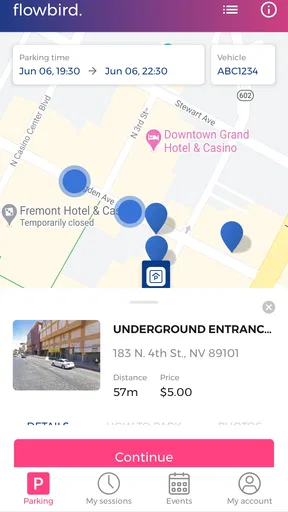
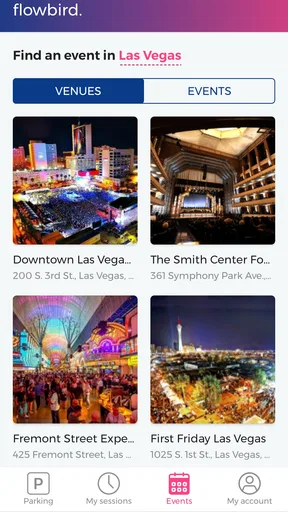
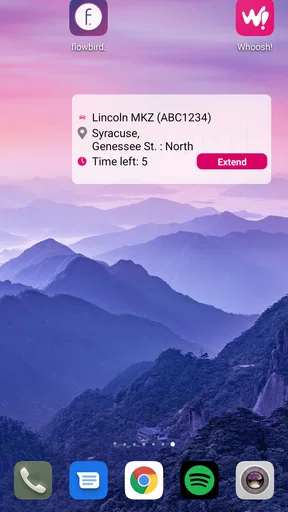
Our Review of Flowbird Parking
 Analysis by Appyee
Parking apps are most useful when they remove a small but annoying task from an already busy moment. Flowbird Parking aims to do exactly that: let me handle a parking session from my phone instead of looking for a machine, carrying change, or walking back to the car just to add time. I reviewed it as a free Auto & Vehicles app from Flowbird, and my overall impression is that it works best when the parking area is already covered by its service and my phone has a dependable connection.
The basic idea is easy to understand. I use the app to deal with mobile parking, choose the relevant parking location, and manage the session from the handset. That sounds simple, but the practical value depends on several things happening together: the location must be supported, the app must identify the right area, the network must respond, and I need to finish the process correctly. When those pieces line up, Flowbird Parking is considerably more convenient than a traditional meter. When one of them fails, the experience becomes less forgiving.
How Flowbird Parking feels in real parking situations
I find Flowbird Parking most useful when I’m already parked and need to handle the session without turning a quick stop into another trip back to the car. This section looks at the small decisions that shape that experience, especially checking the location before starting and leaving enough time to confirm the result. That practical routine also makes it easier to see where the process can snag.
The first few minutes matter more than the feature list
My strongest impression is that this is an app for reducing friction at the roadside. I do not want to stand beside my car while reading a long set of instructions, especially in rain, traffic, or an unfamiliar street. Flowbird Parking is most appealing when I can open it, recognize the parking area, complete the required steps, and get on with my day.
That convenience is different from simply replacing coins with a phone. A physical meter is visible and usually gives immediate feedback, while a mobile app asks me to pay attention to the selected location and the status of the session. The phone-based approach is better for people who dislike returning to the vehicle to extend parking, but it adds a digital checkpoint that should not be ignored.
I would not treat the app as a universal parking map. Its usefulness depends on whether the specific place where I am leaving the car is served by Flowbird. Before relying on it for an important appointment, I would check the signs at the location and confirm that the area is available in the app. That habit prevents the most avoidable mistake: assuming that a familiar parking app works everywhere.
Connectivity is part of the parking experience
Because the service is handled through a phone, connectivity can shape the entire session. A strong mobile connection makes the process feel quick and reassuring. A weak signal, a congested public network, or a momentary service interruption can make me wonder whether the parking action was actually completed. That uncertainty is more stressful than using a meter with a printed or visible confirmation.
I found it useful to think of the app as a connected transaction rather than an electronic replacement for a paper ticket. I would not start the process while driving, and I would not close the app immediately after tapping through the screens without checking for a clear confirmation. The extra glance is worthwhile because parking enforcement depends on the session being registered, not merely on my intention to start it.
This also affects extensions. If I am leaving a café or meeting and want to add time, the ability to do so from the phone is one of the app’s most practical advantages. However, I would make the change before the current period becomes critical, particularly in a basement, crowded event area, or street with unreliable reception. Waiting until the final minute turns a convenient feature into a race against the connection.
A realistic everyday example
Imagine arriving in a busy town center for a short appointment. I park, read the roadside information, and open Flowbird Parking while standing safely away from traffic. I select the matching area, review the session details, and complete the parking process. During the appointment, I realize I need more time. Instead of leaving the building and walking back to the car, I use the phone to adjust the session, provided the location and its rules allow that action.
That is where the app earns its place. The benefit is not flashy; it is the saved walk and the reduced chance of returning to an expired session. At the same time, I still need to keep track of the selected vehicle and location. A phone can make parking easier, but it does not remove the responsibility to check signs, restrictions, and the final status.
What changes when I use it on the move
Flowbird Parking makes the most sense for drivers who regularly move between supported urban parking areas. It is particularly useful when I am carrying bags, traveling with children, or arriving late for an appointment. In those situations, handling parking from the curb or from inside a building is more comfortable than searching for a machine.
The phone context also introduces distractions. I should never operate the app while driving, even if I am only trying to remember a location or extend a session. The best workflow is to park first, move to a safe place, and then use the app. For passengers, the process may be easier, but I would still have them confirm the street and area against the physical signs rather than relying on the screen alone.
For visitors, the main challenge is orientation. A local driver may recognize the parking zone immediately, while a visitor may be choosing between nearby areas with similar names. I would slow down at that point and compare the app’s location with the sign beside the car. Selecting a nearby but incorrect area is a more serious problem than taking an extra moment to verify the details.
Small habits that make the app safer to use
My first practical tip is to prepare before reaching the busiest part of the street. If I know I will need mobile parking, I make sure the phone has enough battery and that I can access the account or payment flow without searching through settings at the roadside. This is not a special feature of Flowbird Parking, but it matters more with a connected parking service because a dead phone removes the convenient route at exactly the wrong time.
My second tip is to read the location sign before touching the confirmation button. The app can help me complete the transaction, but the sign remains the authority for restrictions, hours, and local instructions. I also keep the confirmation visible long enough to understand the session details. That simple pause helps catch a wrong vehicle, wrong area, or wrong duration before I walk away.
My third tip is to leave a little time for recovery. If I am parking before an appointment, I do not wait until the last possible moment to start. A slow connection or an unexpected login step can take longer than expected. Starting while safely parked gives me room to resolve a problem without feeling pressured.
When the process does not go smoothly
The weak point of any connected parking app is the gap between beginning an action and knowing that it succeeded. If the screen loads slowly or the connection drops during payment or session setup, I should avoid blindly repeating the action. First, I would check whether the app shows an active session or confirmation. Repeating too quickly can create confusion, while assuming success without checking can leave the vehicle improperly parked.
If the phone battery is nearly empty, I would treat that as a warning rather than starting a complicated parking task casually. A charger in the car can help, but it is not a substitute for confirming the session before leaving. I would also keep the local parking information in view, since the roadside instructions remain useful if the app becomes unavailable.
Recovery is easier when I know the exact place, vehicle, and time connected with the attempt. I would note those details mentally or keep the relevant confirmation on screen while resolving the issue. The app cannot make a weak signal disappear, but a careful sequence can prevent a technical hiccup from becoming a parking dispute.
How it compares with meters and other parking options
Compared with a traditional parking meter, Flowbird Parking is more flexible when I need to extend a session without returning to the car. It is also more convenient when I do not have coins or when the meter is not close to the vehicle. The trade-off is that the phone and connection become part of the process. A meter may be preferable when I want a visible, self-contained transaction and the area has poor reception.
Compared with paying through a broader city or transport app, Flowbird Parking has a more focused purpose. That can make it easier for someone who wants a dedicated parking tool rather than an app filled with unrelated services. On the other hand, drivers who already use an official local parking system may prefer keeping everything in one place, especially if that local option is the one clearly promoted on the street.
I also would not choose it simply because mobile payment sounds modern. The right choice depends on the location and the reliability of the connection. If the signs point to another approved method, or if I am in an area where my phone regularly loses service, the usual alternative may be the smarter one. Convenience is valuable only when it remains dependable at the moment I need it.
Privacy and data-conscious habits
Using a mobile parking service naturally means I should be thoughtful about the information I enter and the way I use the app. My practical approach is to provide only what the parking process requires, review the selected vehicle and location before confirming, and avoid using public Wi-Fi for a sensitive transaction when mobile data is available. These habits are sensible for any parking payment app and help reduce avoidable exposure.
I also avoid leaving the app open longer than necessary. Once I have checked the confirmation and any active-session details, I can close it and return my attention to the trip. Keeping the phone locked with a screen code is another simple precaution, particularly if the device is shared with family members or left in the car.
For people who are especially cautious about phone-based services, the important question is not whether an app is convenient in theory, but whether its connected workflow fits their comfort level. Someone who prefers cash, a card meter, or a printed receipt may feel more confident with those options. Flowbird Parking is better suited to drivers who accept that parking management will happen through their phone.
Who should use it, and who should skip it
I would recommend Flowbird Parking to drivers who often park in supported areas, dislike returning to the vehicle, and are comfortable checking a mobile transaction. It is also a good fit for people who make short stops that sometimes run longer than planned. The ability to manage the session remotely can be genuinely useful in those everyday situations.
I would be more cautious about recommending it to someone who rarely uses smartphone payments, has an unreliable phone, or routinely parks where mobile coverage is poor. It may also be the wrong choice for a driver who wants the simplest possible interaction with no account or connection concerns. In those cases, the local meter or another clearly authorized method may feel more dependable.
The app has reached a substantial audience, with over a million installs and an average rating of 3.8 from around fifty thousand ratings. I read that as a sign of practical usefulness combined with a noticeable amount of variation in user experience. Parking conditions differ from one place to another, so I would judge it less by the headline rating and more by how well it matches the areas where I actually park.
Compatibility, maturity, and everyday value
Flowbird Parking is a free app, carries an Everyone age rating, and has been available since December 7, 2018. Its current version is 3.17.2, with support beginning at Android 7.1. Those details make it approachable for many Android users, including people who are not using the newest handset, although the real-world experience can still vary with the phone, operating system condition, and network.
As an app from Flowbird, it feels focused on one job rather than trying to become a general travel companion. I appreciate that focus because parking is often something I want to finish quickly. The downside is that a focused parking app is only valuable when its coverage matches my destination. I would check the supported location before making it part of my routine.
After using it, my view is positive but practical. Flowbird Parking can turn a tedious return-to-the-meter task into a phone-based workflow, and its greatest strength appears when I need to extend parking from somewhere else. Its main weakness is not complexity for its own sake; it is dependence on the correct location, a working phone, and a reliable connection.
My connectivity verdict is simple: use Flowbird Parking when the area is supported and your phone is ready, but keep the roadside signs and a backup plan in mind. I would happily use it for ordinary city stops and appointments where mobile service is steady. I would not rely on it blindly in a dead-signal car park, with a nearly empty battery, or when the local signs direct me to another payment method. Used with those limits understood, it is a useful free parking companion rather than a replacement for common sense.
Privacy and Permissions
See what permissions an app requests and how it handles your data.
- Location
- approximate location (network-based), precise location (GPS and network-based)
- Phone
- read phone status and identity
- Photos/Media/Files
- read the contents of your USB storage, modify or delete the contents of your USB storage
- Storage
- read the contents of your USB storage, modify or delete the contents of your USB storage
- Camera
- take pictures and videos
- Wi-Fi connection information
- view Wi-Fi connections
- Device ID & call information
- read phone status and identity
- Other
- view network connections, control flashlight, full network access, run at startup, control vibration, prevent device from sleeping
Verdict
Strengths of Flowbird Parking
- Pay for parking directly from your phone without using a meter.
- Extend your parking session remotely when allowed in your location.
- Available in many cities, making it useful for frequent travelers.
- Digital receipts make it easier to track parking payments.
- Parking alerts can help reduce the risk of overstaying.
Limitations of Flowbird Parking
- Coverage and features vary considerably between cities.
- A service fee may be added to the parking cost.
- Requires mobile data or Wi-Fi to start a parking session.
- Location detection may select the wrong zone if not checked carefully.
- Refunds and session cancellations may depend on local parking rules.
Similar Picks in This Category
View All
Android Auto
Google LLC4.1

maxim — order a taxi & food
PT. SITO4.7

Штрафы ГИБДД: проверка с фото
Pays LLC – Штрафы ГИБДД4.7

Номерограм – проверка авто
Авто Ассист4.8

Дром Авто
Дром4.9

Frequently Asked Questions
What is Flowbird Parking and how does it work?
Flowbird Parking is a mobile parking app that lets you find participating parking areas, check local parking rules, and pay for parking from your Android or iPhone. After creating an account and adding a payment method, you select the correct zone, enter your vehicle details, choose a parking duration, and confirm the session. Availability and features can vary by city.
Do I need an account to use Flowbird Parking?
In most locations, you need to create or sign in to a Flowbird account before paying through the app. Registration generally requires an email address or phone number, vehicle information, and a payment method. Some areas may support guest payment or alternative options, but account requirements differ between municipalities. It is best to check the local instructions shown in the app.
How do I know which parking zone to select?
Flowbird usually identifies nearby parking locations using your phone’s location, while also allowing you to search manually or enter a zone number displayed on signs, meters, or street information. Always compare the app’s details with the physical parking signage before confirming payment. Choosing the wrong zone can result in an invalid session or a parking fine.
Can I extend or stop a parking session through Flowbird?
Whether you can extend a session depends on the rules of the selected parking area. Where extensions are permitted, the app may allow you to add time before the session expires, subject to maximum limits and local regulations. Some locations may also allow early termination, but unused time is not necessarily refundable. Review the confirmation screen and local policy carefully.
What should I do if the payment fails or I receive a parking ticket?
If payment fails, check your internet connection, confirm that your card or digital payment method is valid, and make sure the selected vehicle and zone are correct. Do not assume that a failed transaction created a valid parking session; verify the active-session screen or confirmation message. If you receive a ticket despite a completed payment, save receipts and contact Flowbird support or the relevant parking authority.
